

How I Built an Agentic OS on Top of My Obsidian Knowledge Vault


There's a moment in every knowledge engineer's life where their tooling finally stops fighting them and starts working with them. For me, that moment came when I combined Andrej Karpathy's LLM-wiki model for Obsidian with a custom-built agentic dashboard I call Invariant — and suddenly my AI agents had the full context of who I am, what I know, and what I'm building.
This is the story of how I got there.
The Problem: AI Agents Are Brilliant Amnesics
If you've used LLMs for professional work, you've felt the friction. Every new conversation starts cold. You paste your background, re-explain your stack, remind the model of your constraints. It's like hiring a brilliant contractor who loses their memory overnight.
I needed a different approach. One where my AI agents could walk into a session and already know:
My professional history, roles, and strengths
My current projects and priorities
My tech stack, tooling, and architecture decisions
My methodology and standards
The answer was to treat my personal knowledge base not just as a note-taking tool, but as the ground truth layer for every AI-assisted workflow I run.
Step 1: The Karpathy LLM-Wiki Model for Obsidian
Andrej Karpathy popularised the idea of maintaining a personal wiki structured for LLM consumption — essentially, a knowledge base where each file is a dense, self-contained document about a concept or entity, written in a way that's easy for a language model to parse and reason over.
I adapted this pattern in my Obsidian vault at /brain-squared/, structured as:
brain-squared/

How Injection Actually Works
The power of this model comes from how these markdown files are loaded into AI sessions. Rather than copying and pasting context manually each time, the relevant files are injected into the agent's context window at session start — either via tool configuration, a session bootstrap file, or directly as system context in an API call.
In practice this means:
A short session prompt references which vault files to load
The agent reads them as plain markdown — no special format, no embeddings, no vector database needed for most use cases
The content becomes part of the model's working context for that entire session
This is simpler than it sounds. Markdown is an ideal format for LLM injection because it's structured enough to signal hierarchy and importance, but plain enough that models have been trained extensively on it. A well-written entity file reads almost like a briefing document — and that's exactly how the model treats it.
For example, a stevia-framework.md entity file doesn't just say "Java test automation framework." It documents the GitHub coordinates, the co-authorship context, the architectural patterns (TestNG + Selenium 4 + Spring 5), the Maven publication history, the commercial context it was built in, and how it relates to other entities in the vault. When that file is in context, the model can reason about the framework as a professional artifact rather than a name.
The Master Profile File
The centrepiece of the vault is george-kogketsof.md. This is a single Markdown document that aggregates:
Career narrative (military C2 systems → BSS/telecom → iGaming → cloud commerce)
Key technical signatures (IAF, Stevia, Anax, QAegis methodology)
Current positioning (pursuing Head of QA Engineering roles in iGaming, fintech, SaaS, telecom)
Active projects and sprint context
Interview anchors and competitive differentiators
This file is loaded directly into AI sessions as system context. It transforms a cold conversation into one where the agent immediately understands the person it's working with.
Wiki Entities as Depth Layers
Where the master profile is a summary, the entity files are the depth. I maintain dedicated entries for:
Professional tenures — each employer as its own entity, including team scope, tech stack, measurable outcomes, and key decisions made
Frameworks and tools — architecture, usage patterns, version history, and relationship to other tools
Active projects — current sprint state, tech stack, design decisions, open questions
Methodologies — the QAegis framework, ISTQB standards, testing philosophies
When new material emerges — say, an automated JD analysis surfaces a gap in documented skills — I create or update the relevant entity. For example, my Persado tenure and Java OSS co-authorship (13 years, two open-source frameworks: Stevia with 72 GitHub stars, Anax with 284 commits) were recently formalised into dedicated wiki entries after they were flagged as undocumented strengths by the Invariant JD analyser. The vault gets richer with every pass.
Step 2: Invariant — The Agentic OS Dashboard

Once the vault became a reliable knowledge substrate, the next question was: how do I orchestrate agents against it systematically, across different task types, with real accountability for cost and context?
The answer is Invariant — a personal agentic OS dashboard I'm building at /Invariant. It's built on Next.js 15, Tailwind CSS v4, Prisma, and PostgreSQL, with a GitLab CI/CD pipeline deployed to my home Kronos server.
The design philosophy is deliberate: Invariant is a data display and agent-trigger layer, not a continuously running inference engine. Every agent call is bounded, manually triggered, and purposeful. This keeps costs predictable, the human in the loop, and the system sustainable.
The Skills System: Encoding 20 Years of QA Thinking into Agents

The most distinctive feature of Invariant is its skills system — a directory of specialised instruction sets that agents load before executing a task in a given domain.
Think of a skill as a senior QA engineer's mental model, made portable. Before an agent generates test cases from a user story, it loads the relevant qa-rules skill. Before it analyses a QA Engineering job description, it loads the qa-engineer skill. The skill doesn't tell the agent how to run tests — frameworks like Playwright and Selenium do that. It tells the agent what a senior QA engineer would think to test, and why it matters.
This distinction is the gap that most AI-assisted testing setups miss entirely. An agent without domain skills will test the happy path. An agent with the right skill will ask: does this table paginate correctly? Does it preserve sort order after a filter is applied? Does it degrade gracefully on a 320px viewport? Does the API return the right total count when the result set is filtered?
Skills live as structured markdown files under a /skills directory, organised by domain:
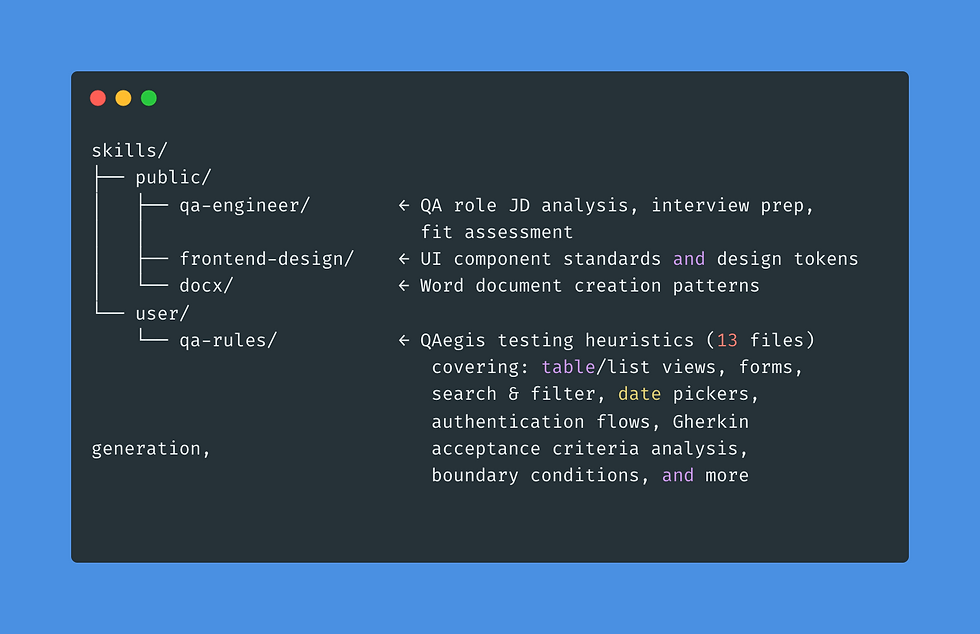
The qa-rules skill is where 20 years of testing instinct becomes machine-readable. Each of the 13 files encodes heuristics for a specific UI pattern or testing context. The table/list heuristic alone covers pagination (boundary values: first page, last page, single result, empty state), column sorting (initial state, ascending, descending, multi-sort interactions), row-level actions (select, bulk-select, delete with confirmation), responsiveness at common breakpoints, and loading/error states. These aren't generic best practices — they're the specific failure modes that ship to production when no one is looking in the right direction.
Without the skill, an agent given a user story for an account list screen generates three tests: happy path load, empty state, and a search filter. With it, the agent generates 17 — including the ones that catch the bugs that reach production. That's the difference between a code generator and a domain-calibrated testing partner. The skills system is the calibration mechanism.
The Job Pipeline Kanban
The most immediately useful feature is the job pipeline kanban. Every role I'm evaluating moves through stages — discovery, analysis, application, interview, and offer — backed by a Prisma schema with full REST API routes, presented in a focused "Focus mode" single-board UI.
But the kanban is just the surface. The real value is in what happens when you open a card and trigger analysis.
In-Browser Job Description Analysis
Embedded in each job card is an AI-assisted JD analysis flow. When I paste a job description and trigger analysis, it:
Loads the qa-engineer skill — priming the agent with QA leadership evaluation heuristics
Calls the Claude API (Sonnet, streaming) with the JD, the skill, and george-kogketsof.md as context
Produces a structured analysis: fit score, gap map, overqualification tension assessment, recommended interview anchors
Generates a wiki markdown entity and writes it to brain-squared/ as a permanent record
Seeds the Invariant database with role metadata and analysis results
This closes a loop that previously required significant manual effort. Analysing a new role doesn't just produce a one-off assessment — it enriches the vault with a permanent record of that role and how it maps to my profile at that point in time. The next analysis runs with more context than the last.
Token Consumption Tracking


Running multiple models across multiple task types accumulates cost quickly if you're not watching it. Invariant tracks per-session token consumption across all model calls, broken down by model and task type.
This serves two purposes. First, it's basic cost hygiene — I can see exactly what each workflow costs and optimise accordingly. Second, it informs model selection decisions: knowing that a deep JD analysis on Opus costs 8x a Sonnet run for ~15% better output quality helps me make deliberate choices rather than defaulting to the most powerful model for everything.
The Agent Roster
Invariant tracks a multi-model agent registry. I run different models for different task categories:
Model | Agent | Typical Use |
Claude Sonnet 4.6 | Primary | JD analysis, drafting, most tasks |
Claude Opus 4.8 | Deep analysis | Architecture decisions, complex reasoning |
Gemini 2.5 Pro | Alternative reasoning | Cross-validation, longer context |
Gemini 2.5 Flash | Fast iteration | Quick queries, summarisation |
Qwen3.5 14b | Light Coding | Light coding skills |
Per-session consumption tracking and context window monitoring keep me aware of costs as I scale up agent usage.
Step 3: The Dual-Machine LLM Inference Setup
Running agents locally required solving the inference problem. My home setup consists of:
Mac Mini M4 Pro — unified memory, primary working machine, where all Claude Code sessions run
CachyOS Linux desktop — RTX 4070 Ti, 12GB VRAM, dedicated GPU inference box
Kronos Unraid NAS — home server running deployed applications
The challenge is that these are two separate machines on the same network — the Mac is where I work, the GPU is where I want to run inference. Without bridging them, the Mac has no way to call the LM Studio inference server running on the CachyOS box. An SSH tunnel solves this: it forwards a local port on the Mac directly to the corresponding port on the GPU machine, so any API call that Claude Code makes to localhost:1234 transparently lands on the CachyOS LM Studio server.
ssh -L 1234:localhost:1234 <user@192.168.x.x> -NOne command. From that point forward, the Mac's Claude Code sessions route inference calls to the GPU box without any reconfiguration. The Mac handles ergonomics and session management; the dedicated GPU handles throughput.
Current configuration:
CachyOS (LM Studio): Qwen3 14B Q4_K_M at ~60 tok/s — full GPU fit, used for Claude Code coding sessions
Mac Mini M4 Pro: Qwen3.5-35B-A3B — deeper reasoning tasks, longer context where unified memory gives headroom the 12GB VRAM can't
Step 4: Bootstrapping Every AI Session
The vault and the tooling are only valuable if agents have access to them at the start of every session, without manual setup. I solved this with a global Claude configuration:
~/.claude/CLAUDE.md — a 134-line session bootstrap that loads Invariant project context, active sprint state, coding conventions, and pointers to the relevant vault files for the current work focus
~/.claude/AGENTS.md — a 382-line QAegis engineering standard encoding my testing philosophy, framework patterns, quality heuristics, and the conventions that make generated code and test plans consistent with my existing body of work
Every Claude session in my environment starts with these files in context. The agents understand my projects, my standards, and my priorities before I type a single prompt.
When I open a Claude Code session to work on Invariant itself, the agent already knows the Next.js 15 App Router architecture, the Prisma schema conventions, the Tailwind v4 setup, and the sprint goals. It codes like a team member who's been on the project from the start, not a contractor reading the README for the first time.
What a Real Session Looks Like
Here's a concrete end-to-end example — evaluating a Head of QA Engineering role at a new iGaming company:
The JD lands. I create a card in the Invariant job pipeline.
I trigger JD analysis. The qa-engineer skill loads. Sonnet streams an assessment: strong fit, one gap in cloud-native observability tooling, primary interview anchor is the Light & Wonder transformation story, no overqualification tension.
A new entity xxx-head-of-qa.md is written to brain-squared/.
I open an OpenCode session. It knows my profile, the role analysis, and my CV. I ask it to draft tailored cover language emphasising the transformation story.
I refine the CV narrative. The updated framing feeds back into george-kogketsof.md as a new interview positioning note.
Every step of that workflow is logged. Token cost: tracked. Model used: recorded. Next time I evaluate a similar role, the prior analysis is in context.
What used to take half a day of context assembly and manual cross-referencing now takes under 30 minutes — with better, more consistent output.
The Compound Effect
The thing that surprised me most about this system is that it compounds. Each session leaves the vault slightly richer. Each new entity adds depth that future sessions can draw on. Each JD analysis sharpens the profile file. The agents get incrementally more useful not because the models improve (though they do), but because the context they operate in keeps improving.
This is the fundamental insight from the Karpathy wiki model applied to professional AI workflows: the value isn't in any single agent call. It's in the substrate those calls operate against — and in maintaining that substrate with the same rigour you'd apply to any critical piece of professional infrastructure.
What's Next — And Where I'd Like Your Input
The vault and Invariant are both actively evolving. Three challenges are on my radar, and I'd genuinely like to hear how others are approaching them:
Automated JD pipeline — the current flow is manually triggered. I'm moving toward batch processing a shortlist of roles in a single run, with the vault automatically updated after each analysis. The design question is how much of that should be fully autonomous vs. human-in-the-loop at a review gate.
Unified memory hardware — the 12GB VRAM ceiling on the RTX 4070 Ti is a real constraint for larger quantised models. I'm evaluating a higher-unified-memory configuration to collapse the two-machine inference setup into one. If you've made the move to a high-unified-memory setup for local LLM inference, I'd like to compare notes.
Brain-squared → Invariant sync — today, vault updates and dashboard state are loosely coupled. I'm designing tighter synchronisation so that a new entity written by a JD analysis automatically surfaces in the relevant Invariant views without a manual refresh step.
The system is already paying compound returns. Each of these moves the ceiling higher. What does your context-management setup look like? Drop it in the comments — I read all of them.
Closing Thoughts
The Karpathy LLM-wiki model changed how I think about personal knowledge management. The question stopped being "how do I capture this?" and became "how do I make this usable by a machine working on my behalf?"
Paired with Invariant as the agentic orchestration layer, the result is something that genuinely feels like a cognitive extension of my professional practice — not a collection of notes I rarely revisit, but a living substrate that makes every AI-assisted session more effective than the last.
If you're a QA engineer, architect, or technical lead who works heavily with AI tools, I'd ask you one question before you close this tab: when your agent generates test cases, is it generating the ones a senior QA engineer would write — or just the ones that were easy to think of?
The gap between those two outputs is the gap the skills system closes. And unlike the agents themselves, that gap doesn't close on its own.
If you found this useful: share it with someone who's still asking their AI to write tests without giving it any QA expertise to draw on. And if you've built something similar — a vault structure, a skill set, a local inference setup — I'd like to hear about it in the comments or connect on LinkedIn.
The Karpathy gist that started all of this is here.



Comments